
 Michael Zimmerman
How to Rank Higher in Apartment Searches with Google Ads
 Michael Zimmerman : February 3, 2025
Learn how to use Google Ads effectively to secure the top spot in apartment searches and attract more qualified renters to your community.

Google Ads are easily one of the most effective sources for connecting your apartments to interested renters at critical moments in their search.
But the truth is, Google Ads can be a bear—whether you're a seasoned portfolio marketer or new to promoting apartments.
This guide will detail how apartment marketers can use Google Ads to drive leasing performance—starting with the basics.
Google Ads is a Pay-Per-Click (PPC) digital advertising platform that helps marketers create awareness, drive website traffic, and generate leads by placing targeted ads in front of the right audience at the right time.
Google Ads can appear on:
Beyond just higher visibility, Google Ads offers marketers exceptional control. You can decide the content of your ads, where they appear, and to whom they are shown.
You can aslo adjust your budget dynamically to align with your goals, track near real-time performance data to measure success, and make necessary changes.
For apartment marketers, Google Ads offers several ad formats:
When a prospect goes to Google and searches for '2-bedroom apartments in downtown Kansas City,' search ads will appear at the top of the search engine results page for the apartment communities that bid for those keywords. These text-based ads include a compelling headline, display URL, description, and extensions such as a 'Call Now' button, link to directions, and sometimes a photo. Here's how to craft apartment search ads that convert.
Display ads appear across a renter's browsing experience on websites outside the Google search engine—including websites and YouTube. These ads can take many forms—banners, video, or motion graphics—and feature high-quality visuals highlighting your community’s name, logo, amenities, and more. Display ads keep your property top-of-mind during a renter's apartment search by showcasing your brand at key moments.
Marketers can use photo and video display ads on YouTube to showcase their apartments. These ads can run as short, unskippable 6 to 15-second video bumpers or longer, skippable ads played before, during, or alongside YouTube videos. Additionally, display ads can be placed within the YouTube platform, such as above the menu of upcoming or recommended videos. Leveraging the best visuals of your unit interiors, amenities, and exteriors, or even using resident testimonials, helps create a strong emotional connection with renters.
Many prospective renters will use Google Maps to perform discovery searches for apartments in their desired locations. Marketers can enhance their communities' presence with Google Maps ads, increasing visibility for their Google Business Profile card featuring photos, reviews, and contact details. Here's how to use apartment ads in Google Maps.
Okay, that's the high-level overview of Google Ads. Next, let's explain how renters view them in their search.
Say a prospective renter goes to Google and searches for “downtown kansas city apartments with parking." Here’s an example of what they could see:
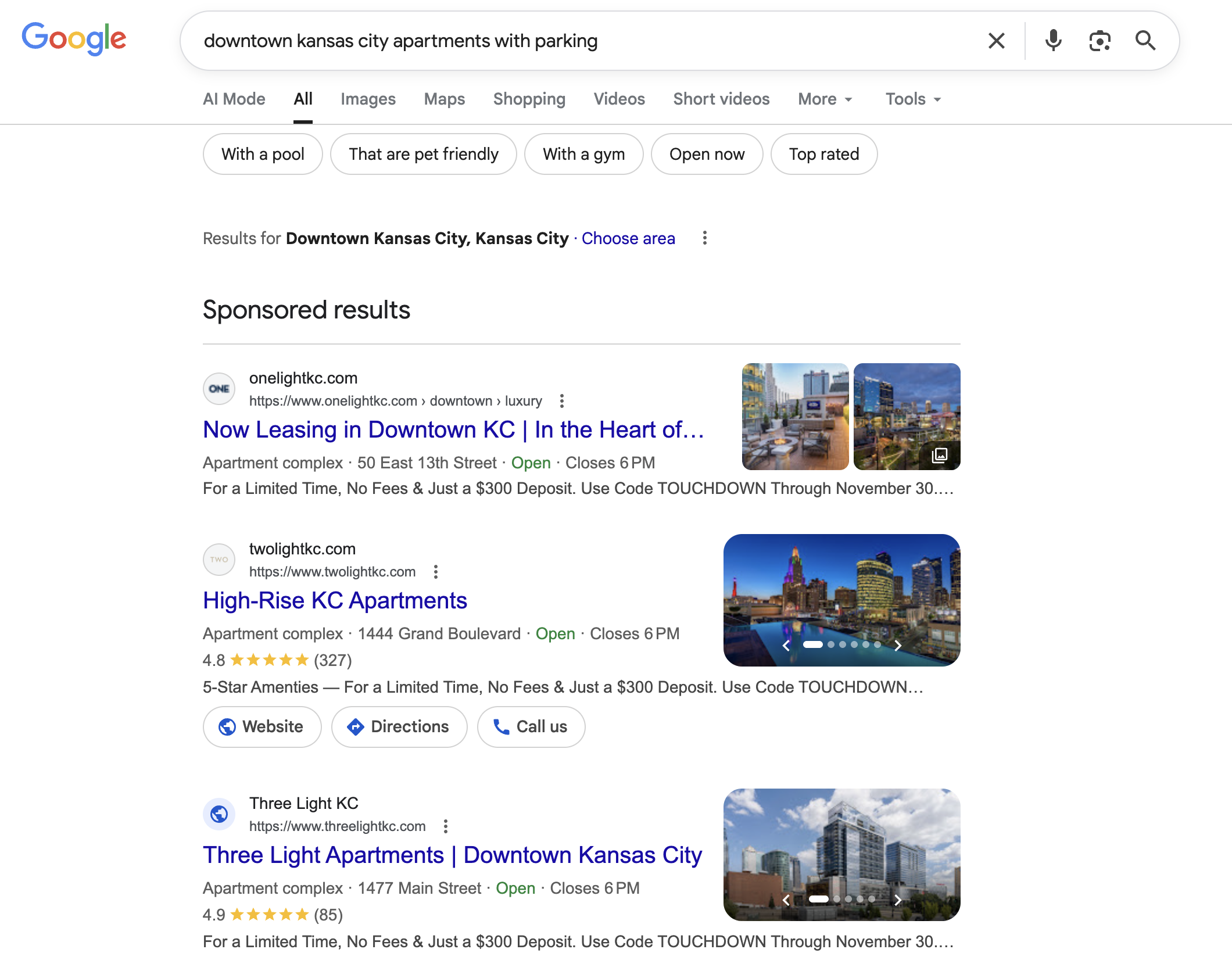
The first four results are Google Ads (marked with “Sponsored”) for three apartment communities who bid on those keywords.
Renters see these ads as highly-relevant, given their placement at the top of the search engine results page (SERP). They're likely going to click on one (or more) of these ads to explore the community website, check about a parking garage, see floorplan availability, rent prices, and other features they're interested in.
What happens after the click matters. A highly-relevant ad is only as successful as the website renters visit. It should clearly address their needs and make it easy for them to become a qualified lead and sign a lease.
The more often that becomes the result of the ad, the more that ad is shown, the lower it's cost-per-click will be, and the more likely it is that it generates qualified traffic, leads, and leases—a connection known as the Apartment Website + Digital Ads Flywheel.
Essentially, a Google Ad targeted to the right prospect makes it more likely they'll choose your apartments over others. This leads to more qualified traffic and leads. Every apartment marketer strives for this result, whether in a lease-up or having a few extra vacancies to fill quickly.
So, the next question is, 'How did these communities in the example above succeed in getting their Google Ads to show?'
To earn those spots, apartment marketers at those communities took the following steps:
These steps are critical because, contrary to popular belief, Google Ads isn’t just about bidding the most money. Instead, Google prioritizes relevance to ensure users see ads that match their search intent like the example above.
Google determines ad placement using a metric called Quality Score, which evaluates:
Google combines your Maximum Bid (or how much you're willing to pay when someone clicks on your ad) and Quality Score to calculate AdRank:
Maximum Bid × Quality Score = AdRank
The higher your AdRank, the better your ad placement—regardless of your Maximum Bid.
This means even advertisers with smaller budgets (like most apartment marketers who have a budget that must work for multiple properties) can achieve top placement if their ads are highly relevant.
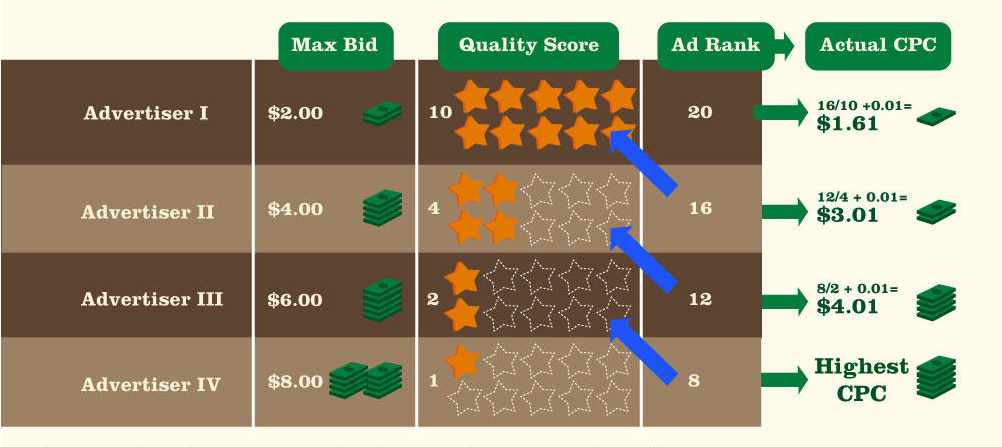
The graphic below further illustrates how Google Ads' business model prevents only the highest bidders from getting their ads placed first:
(Source: Wordstream)
For example:
An ad's cost-per-click factors both your ad's Quality Score and the Ad Rank of the ad just below yours using this formula:
Ad Rank of the ad below your ad / Your ad's Quality Score + $0.01 = Your cost-per-click
Advertiser I's cost-per-click was $1.61, while Advertiser IV's was $8.
By Google's standards, Advertiser I's ads will appear more often and generate a higher rate of clicks than Advertiser IV's ads at a lower cost-per-click. Why? The more an ad is clicked, the more money Google makes.
By focusing on the quality of your Google Ad, you can compete with multiple apartment communities vying to target similar keywords. But doing that starts with doing the required background work first.
How Can Apartment Marketers Use Google Ads to Target Prospective Renters?
Let’s revisit our prospective renter looking for an apartment in downtown Kansas City that has parking available.
They type that query into Google and click on a few ads, each taking them to the websites of different apartment communities. One community stands out because its ad and website perfectly align with the renter's needs.
Suppose an apartment community in Kansas City bids on an ad for the generic, hard-to-rank-for search term "apartments in kansas city."
That decision complicates things for two reasons:
Instead, a more specific keyword, such as “apartments in downtown Kansas City with parking,” helps your ad appear to renters actively searching for what your community offers.
That's why you need to research which keywords your community should bid for before using Google Ads.
We'd recommend using tools such as Google's Keyword Planner (free), Google Search Console (free), or SEMRush (free-ish) to research the keywords you should target for your apartments.
Starting there will help you understand what renters are searching for when your apartment community is prominently featured on the search engine results page.
Once you've researched specific keywords for your apartments, the next step is to target keywords your prospective renters typically enter when searching for a community like yours.
We call these keywords 'qualifiers' because they help your apartments reduce the competition and achieve top placement in searches. This makes it easier for Google to show your apartment's ads to the right audience more often.
The more qualifiers you have in your targeted keywords, the more valuable they are! Prioritizing high-volume search keywords with the right qualifiers relevant to your apartment community will significantly boost your Google Ads' performance.
Given all the ambiguity in how people search, Google relies on advertisers by asking them in advance when they'd prefer their ads to appear.
Do they want their ads to appear when someone enters a search that includes selected words, like "apartments" and "Kansas City?" Or do they only want their ads to appear on specified searches such as "studio apartments in Kansas City?"
Google refers to these as "match types," and there are three match types advertisers can select when setting up their ads:
Using match types strategically ensures your ads reach the right audience at the right moment.
Targeting the right keywords matter, but in order for your Google Ads to deliver leasing impact, you must also consider the geographic location(s) of where they're shown.
For example, you can set an ad targeting keywords "apartments in Seattle", but if your ad appears to renters in Nebraska, odds are low that the prospect is going to make a leasing decision.
It's more realistic that renters already near your communities location will become residents—so it's smarter to ensure your ads appear most often to them.
Every Google Ad campaign requires you to set a location for where you want your ads to appear. It's best to keep your ads within a 100-mile radius of your community. Here's how to do geotargeting the right way for your apartment's digital ads.
Unlike other static marketing tools, which can lock you into long-term contracts that level out the number of leads you receive each month (regardless of your community's occupancy), Google Ads has no fixed costs.
Still, you need to be smart about setting your Google Ad budgets. You want to make it possible to dynamically change spending according to your community's unique supply and demand to save money when your occupancy is strong. Here's how to set a dynamic apartment marketing budget—helping you make adjustments to Google Ads as demand changes.
Applying guarantees with digital advertising is tricky because every platform is different, and marketers are responsible for establishing strategies that consistently produce positive outcomes.
That said, there is a simple way to answer the question: Google generated nearly $296 billion in ad revenue in 2025. If Google Ads had not worked on some level, they would not have produced that kind of revenue.
As for that translating into success for apartment marketers, here's proof of the remarkable results Google Ads produced for one apartment community facing a vacancy crisis.
Village West Apartments, a 200-plus-unit community, completed its lease-up and raised rents in just 10 months while only having one leasing office staff member.
How? In addition to owning an engaging website that featured walkthrough video tours and floorplan-specific content, Village West also utilized RentVision's Predictive Digital Advertising solution.
Together, renters could successfully tour and apply for a lease online without seeing the apartments in person; hence, Village West signed 206 leases in 281 days with just one leasing agent.
In total, the community invested just over $15,000 combined on Google and Facebook advertisements during its ever-critical lease-up, which is roughly $35,000 less than the average salary of a leasing agent.
Village West consistently gained the right amount of highly qualified visitors to its website, leading to more engaged leads ready to rent an apartment—this is what a successful Google Ads strategy can do for multifamily properties (with or without the help of Facebook).
Google has implemented many AI tools into its advertising platform, making it even more user-friendly.
For example:
Ad automation is helpful, especially for beginners or dealing with multiple properties. But in order to get the most out of your digital ads, a set-it-and-forget-it, AI-only approach isn't recommended. You or your marketing vendor need to measure and adjust campaigns and budgets frequently to account for constantly changing demand at each property.
All ads use the same basic ad design template. Still, within that template, there is room for customization, primarily thanks to a feature called ad extensions.
Ad extensions allow you to add valuable details to your ads, improving engagement and performance. These include:
Google recently added image extensions to ads, which are even more beneficial to apartment marketers who want to highlight their communities' exteriors, units, and amenities.
Pro tip: Extensions also function as a tie-breaker in the event of a tie on AdRank. In that case, if one ad uses extensions and one does not, the one that uses extensions will likely be placed higher.

Google Ads are an essential tool for apartment marketers. They allow you to control your community's visibility in search engines and can help you create a competitive advantage by displaying search, video, and image ads that capture prospective residents' interest and attention during each stage of their apartment search process.
Additionally, Google Ad campaigns are dynamic. You can use them to generate demand for your communities at the right time and safely dial down your spending when your occupancy is stable. They and other PPC advertisements are the only multifamily marketing source that allows you to make adjustments alongside the frequent changes to your communities' seasonality.
A great Google Ads strategy for your apartments ultimately helps sustain your occupancy year-round. You can get the right qualified visitors to your website precisely when needed and then save money when you don't.
Seem like a lot? Yeah, it is. That's why we created Predictive Advertising—the most effective digital advertising solution for multifamily. If you're looking for an easy-to-implement, smart advertising solution for your communities, you've come to the right place.

 Michael Zimmerman : February 3, 2025
Learn how to use Google Ads effectively to secure the top spot in apartment searches and attract more qualified renters to your community.
 Michael Zimmerman : October 16, 2024
New Google AI Overview Ads offer multifamily marketers a unique way to reach mobile searchers but present visibility and reporting challenges.
Michael Zimmerman : May 27, 2026
Wondering about the performance benchmarks you should aim for with your apartment's Google Ads? We've got the data right here!