



There are probably 10,000 different KPIs multifamily marketers could track with their digital ads. But most aren't even sure where to begin, which ones actually matter, and which ones are worthless.
Whether you're marketing for a portfolio of 10, 50, 100+ apartment communities, that confusion compounds. Which leads to one of the most common pain points I hear from multifamily marketers: Effectively explaining to owners and other stakeholders about what you're doing with ads, the value they provide, and how they are (or are not) working to drive real outcomes.
To confidently evaluate the performance of multifamily digital ads, you need to measure and clearly articulate the inputs upstream rather than chasing misleading outputs that are harder to support. Here's the framework we use to do it.
What's wrong with most multifamily ad reporting?
Everyone wants to know, "What's the cost-per-lease by source?" It's the ideal metric for multifamily. Easy to understand, defensible to owners, and connects ad spend directly to revenue.
The reality is, despite their best efforts, the vast majority of property management companies cannot actually model attribution correctly, making it nearly impossible to measure cost-per-lease by source with any accuracy.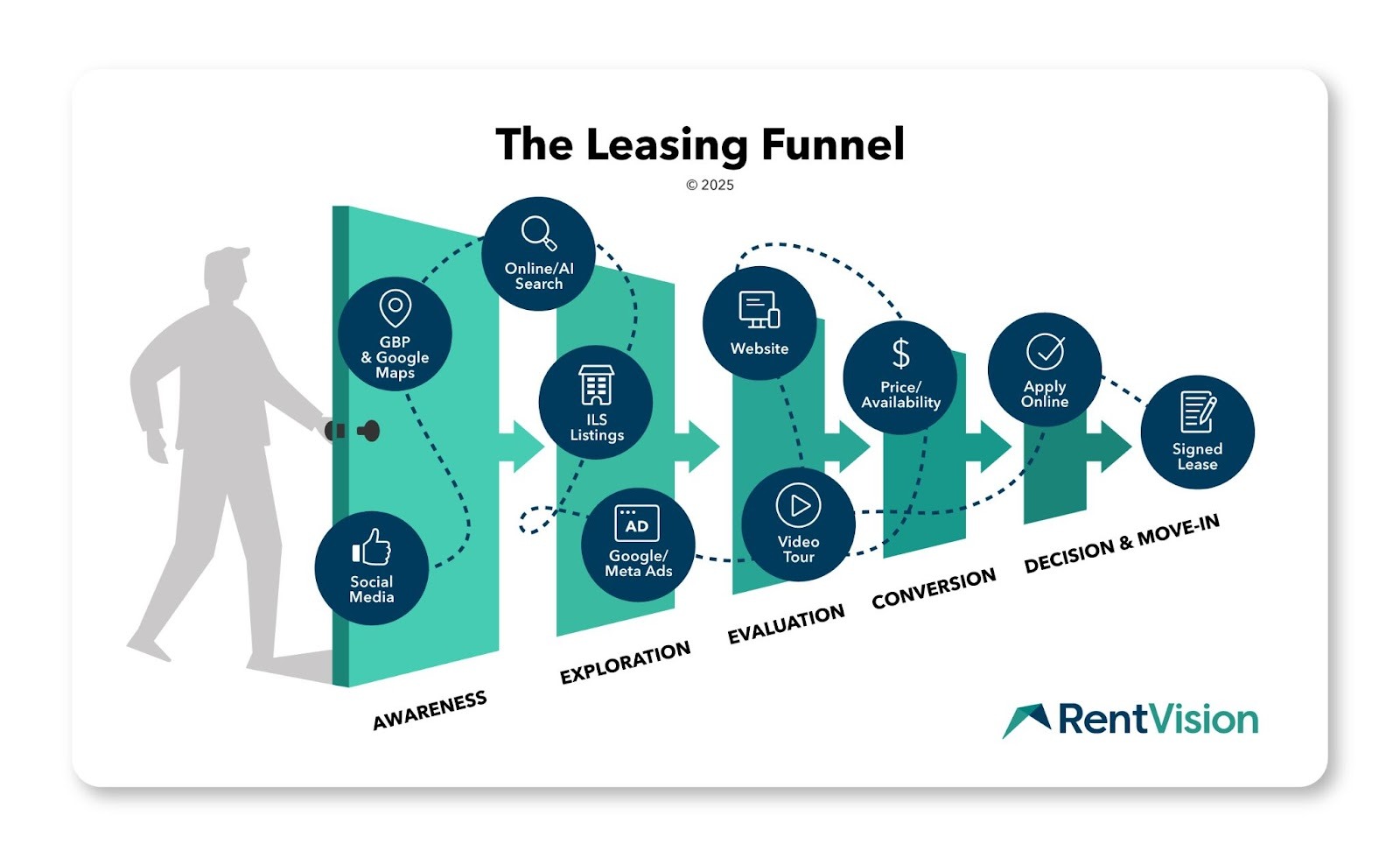
The renter's journey is longer than we'd like to admit, crosses multiple devices and channels, and is ultimately marred by the privacy landscape and siloed data. While we can often see the last interaction a renter made that converted to a lead, we have a hard time seeing touch points before that, which leads marketers to make the wrong assumptions about the performance of their ads.
The proof of this can be found in nearly any apartment community's CRM attribution report. Below is a real monthly lead source data from a portfolio of 100+ communities that perfectly illustrates the problem of poor attribution models.
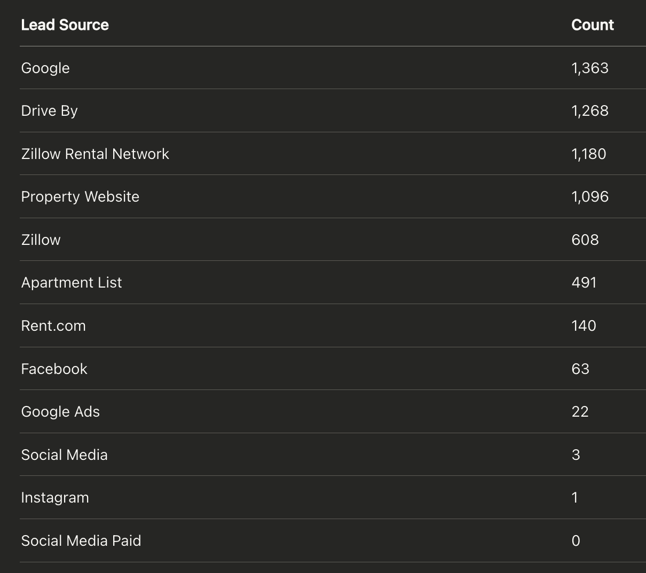
How does this lead count data explain what's actually driving traffic, or if advertising efforts are working? It clearly doesn't.
The top source is Google. Google could mean six different things. Is it paid search? Is it a display ad? Is it organic? Is it Google Business Profile? Did it come from your Performance Max campaign? Is it from Gemini? You can't dial it down. It just says Google…do with that what you will.
Next is the property website, which is the last conversion point and provides zero context as to where the renter first found a community, or how they landed onto the website.
Third is drive bys, which is even more complicated because there's no way 1,268 leads happened to "drive by" the community without first learning about it in an online search.
Then you see Facebook accounts for just 63 leads, social media (?) with three leads, Instagram with only one lead, and social media paid (?) with zero leads. Not only does the labeling of those sources draw confusion, the data itself is misleading.
People typically are not shopping for apartments when they're on Facebook. They may see your community's ad, and they may even click on it, but they're not going to make an impulse buy like they would for a new hairbrush. Leasing an apartment is a weighty financial and life decision.
Using standard attribution methods, those Facebook and Instagram line-items would make you think about cutting those sources.
But that's the trap multifamily marketers, operators, and even some vendors fall into when they're trying to trace everything back to cost-per-lease by source. Cutting Facebook because it's not generating leads ignores the fact that those ads generated 200,000 impressions and bring future renters into your funnel.
Meta Ads do not thrive as traffic drivers. Most renters won't click through from a social app the moment they see your apartment's ad. But when a renter sees your ad a lot of times across their Facebook or Instagram feeds, it sticks in their brain and, eventually, they become a website visitor through another means later in their leasing journey. That’s where Google Ads come into play.
That's why you can't just cut Meta when your attribution data reports zero leases.
The better approach for measuring your advertising performance is to stop looking downstream and start measuring upstream. Look at the inputs – how ads are actually performing, are the right renters being reached, are they engaging on your website and taking leasing actions. From there, the outputs will follow.
When they don't, you'll know exactly what is or isn't working, and what that means for your budget and strategy.
What are your apartment's digital ads doing out in the wild?
Any honest evaluation of performance starts with what your apartment community's ads do when they show up on somebody's screen.
Are they attractive? Are people clicking? Are your dollars being allocated to the right places? Are you getting the right volume of visibility or traffic?
These surface-level metrics can help you see what's happening with your ads right now:
Google Ads metrics
Impressions: An impression is counted anytime your apartments' ads are shown on an internet user's screen.
Clicks: The number of times someone clicked on one of your ads. Clicks are the first signal that an ad is attracting attention and driving traffic to your community website.
CTR (Click-Through Rate): The percentage of people who saw your ad and clicked on it. A higher CTR indicates your ad copy and targeting are resonating with in-market renters.
CPC (Cost-Per-Click): The average price you pay every time someone clicks on one of your digital advertisements. If you paid $1,000 for a specific ad campaign that's clicked on 200 times, then the cost-per-click is $5.00. CPC can vary significantly, depending on supply and demand forces in your community's geographic market, and overall competition.
Percentage of Budget Allocated by Campaign Type: How your total ad spend is distributed across individual campaigns. This tells you whether your dollars are being directed toward the unit types and availability your community most needs to fill.
Meta Ads metrics
CPM (Cost Per Thousand Impressions): This metric calculates how much it costs you to earn 1,000 impressions. Like cost-per-click, a lower cost per thousand impressions indicates your ads are gaining a lot of visibility at an affordable price.
Impression volume: The total number of times your ads were displayed. For Meta campaigns, impression volume is the primary indicator of whether your ads are creating the awareness and demand for your communities.

Example of the Ad Performance Breakdown table in the RentVision Platform.
In Predictive Advertising reporting, we show our clients these baseline metrics to help them see what their ads are actually doing—by platform, campaign, and objective.
What we've found, though, is that most reporting for multifamily advertising stops here and fails to provide the next-level insights you need to truly understand if they're getting your apartments seen by the right renters.
Are your ads reaching the right renters?
To understand who is seeing your ads, you need to look at which keywords renters are actually using when they click on an ad, and which geographic locations those clicks are coming from. Both will help you validate whether your ads are generating qualified traffic or wasting money.
1. What keywords and ad copy are being used?
The first thing to look at in ad performance reports are the keywords renters entered that resulted in your ads appearing. Do those match what you're targeting? Does it align with your ad copy?
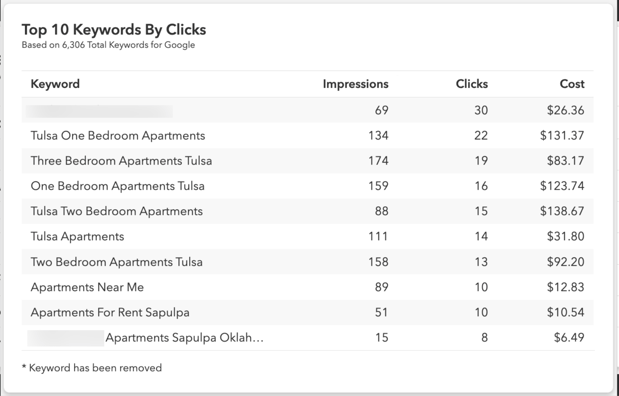
Example of the Top 10 Keywords by Clicks for community's digital ads, as seen within the RentVision Platform.
We designed our clients' keyword strategies to match high-intent queries, using targeting parameters like descriptors, bed counts, unit styles, and locations that accurately describe what their communities offer.
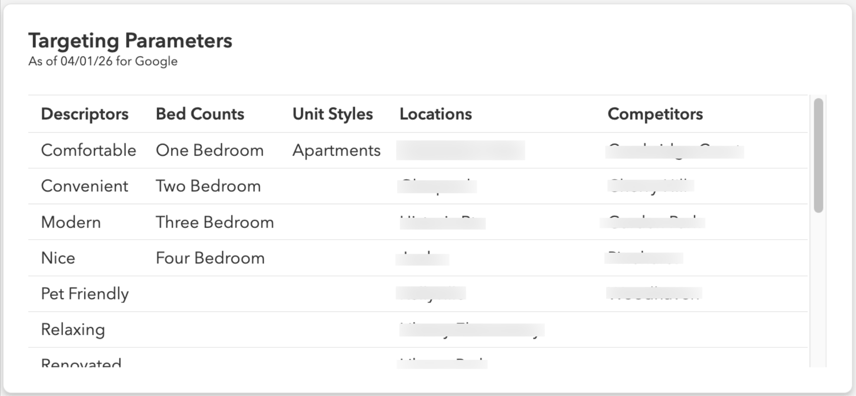
Example of the Targeting Parameters set for an apartment community's ad campaigns, as shown within the RentVision Platform.
Say a renter searches for "luxury one bedroom apartments in Portland." High-intent targeting parameters in that instance include "luxury," "one bedroom," and "Portland." We ensure that we're targeting those keywords, and that the ad copy matches that query.
Review what keywords are currently in play to see if they match the targeting parameters you've set. This will explain whether your ads are showing to renters with actual intent—or just generating volume.
2. Where are ads actually showing?
Targeting keywords matching what your communities offer is step one. Step two is validating that once ads are live, clicks are coming from renters who are already located within a reasonable distance of the property.
Consumer Affairs reports that 53% of moves happen within the same county, while 77% happen within the same state.
For most communities, their best renters are already living within a 100-mile radius from their property, so each campaign should set a targeting radius that ensures their ads will appear within that location to improve traffic quality.
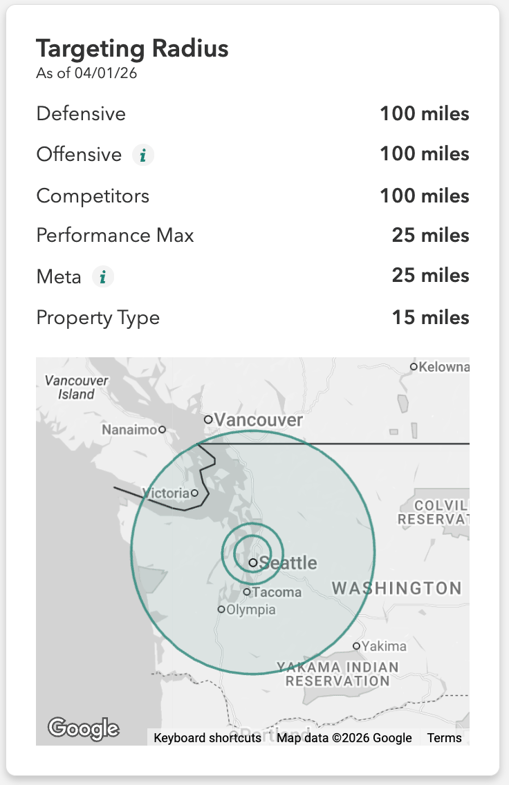
Example of the Targeting Radius set for an apartment community's ad campaigns, as shown within the RentVision Platform.
If location targeting isn't properly set, a community in Seattle could have paid traffic coming from Nebraska (or in wild cases, Bangladesh) reaching users extremely unlikely to move to your community. When more clicks are coming from outside of your preferred geographic area, your ads will struggle to produce leasing impact.
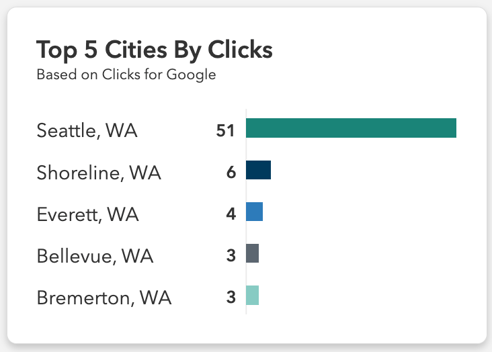
Example of a table showing the top 5 cities by clicks for a community's ad campaigns, as shown in the RentVision Platform.
That said, the right radius isn't the same for every campaign type. Generic keywords need a tighter geographic radius to act as a location qualifier, while location-specific keywords can target a broader area since the query itself narrows intent.
For example, if a renter currently near Seattle is looking for an apartment in Portland and searches "best luxury apartments," the probability that they'd see an ad for a Portland property is low. In generic searches like these, Google doesn't really know they're looking for the best apartments in Portland unless they'd actually included that location-specific keyword in the query.
In the rare instance that a majority of a community's current renters moved from farther than 100 miles away, that targeting logic can change.
Is the traffic your ads generate actually qualified?
Once ad performance metrics, keywords, and click locations check out, the next thing in question is what are paid visitors actually doing when they arrive on your community website?
Think about your own online shopping experience. If you're wanting to buy a car, the longer you look at a specific vehicle, the more photos you look at, the more details you click through, the more likely you are to actually become a lead for that dealership.
The same is true for apartments.
If someone's spending a lot of time on your community website, viewing multiple pages, and looking at photos, floorplans, or availability, the probability of them becoming a lead goes up significantly.
Look at:
Page views per session: The number of pages a visitor viewed during a single visit to your website. The more pages a renter views in one session, the better the quality of traffic. It explains if renters are seriously considering your community and finding the information they need.
Average engagement time: How long a paid visitor spends on your website during a session. Typically, the longer someone spends on an apartment website, the higher the chances are that they become a qualified lead who eventually signs a lease. If time on site is lower, it's usually associated with a higher bounce rate – i.e. visitors who leave within seconds who don't take any action.
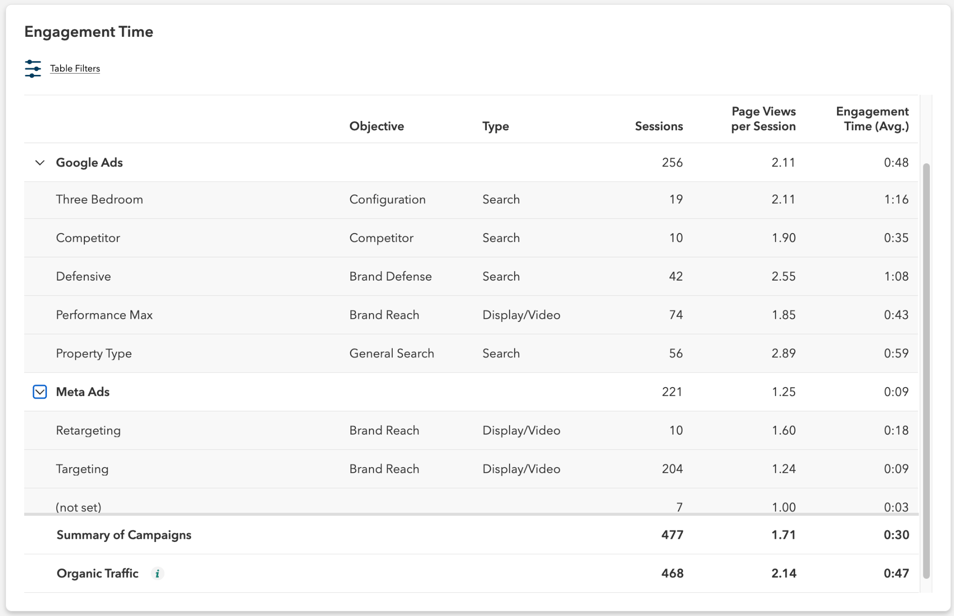
Example of the Engagement Time table in the RentVision Platform.
The organic traffic benchmark
The standard for evaluating the quality of your paid traffic isn't some arbitrary number. It's actually your own organic traffic.
Organic traffic is usually your best quality traffic and where most of your leads come from. While you can't control what organic traffic is coming to your website, their engagement accurately represents website performance independent of ads.
If your paid traffic approaches the same level of interest as determined by page views per session and average engagement time as your organic traffic, it's a strong signal your ads are reaching the right renters and that those visitors are finding what they're looking for.
If paid traffic engagement is within 25% of your organic engagement benchmarks, your apartment's ads are doing good. If paid traffic engagement matches or exceeds organic engagement, your ads are excellent.
Note: The organic benchmark isn't relevant for Meta, display, or video campaigns, or Google Performance Max campaigns, since those are more focused on driving awareness, not traffic.
What low engagement means
Low engagement from paid traffic is a two-fold analysis—and which direction you look depends on what the data is telling you.
If both your organic and paid traffic engagement are low, the problem likely isn't your ads. That's a signal of a website or pricing issue—something about the experience renters find when they arrive isn't compelling enough to keep them there, regardless of how they found you.
Evaluate the website's content, structure, and whether pricing and availability are clearly presented—all of which are essential in the blueprint of a high-converting apartment website.
If your organic engagement looks healthy but paid traffic engagement is lagging, that points back to the ads themselves. The targeting, keywords, or geographic radius may be pulling in renters who are less likely to lease. Go back to the starting point of your ad evaluation and assess whether the right renters are being reached.
Are ad engagements converting into leasing actions?
The more engaged renters are with the content on your community website, the higher likelihood they'll convert to a lease, which is the ultimate goal of your ads strategy.
But how you count conversions matters, as they should be tied directly with leasing actions.
What doesn't count as a leasing action
Generic clicks: While clicks are a measure of engagement, they alone can't accurately measure conversions since website designs vary. We see some apartment websites that require visitors to click a 'check availability' button on every individual floorplan configuration, which then gets reported as a conversion. If a property has 15 or 20 floorplan configurations structured this way, conversion rates would look astronomical. But that reflects a website architecture issue, not genuine leasing intent. Or when websites are one-page wonders where all community information is on a single, long-scrolling page, conversion rates would appear much lower than reality since there'd be fewer clicks.
Video views: If a prospect watches a video on your website and decides your apartments aren't for them, that's not a conversion. What you want to count are the actions they take after watching a video. Do they want to get in contact with the community, or schedule a tour? That's why video views as a standalone metric shouldn't be reported as a conversion action.
Gallery views: The same logic with not counting video views as conversion also applies to gallery views on an apartment website. While it's encouraging that a renter is taking the time to explore multiple photos of your units, amenities, and other features, you should still evaluate what happens after these views. Again, they may view your photos and decide your community's not the best fit.
What does count as leasing actions
What really counts as conversions on your apartment website are events that show renters are trying to take the next step.
Look for these events, which show actual leasing intent:
Apply clicks: They open your application portal because they're interested in leasing. Maybe not right now, but more than likely, the user is asking the question of, “What is it going to take to move in here?”
Direction clicks: They click on your address link on your website to get navigation to your property. The user is either trying to navigate to the community, determining a commute time, or identifying the exact location of the property.
Call clicks: They click on your phone number or phone icon on your website to call your leasing office.
Appointment form clicks: They set a time to tour or meet with a leasing agent from your website.
Contact form submissions: They complete any contact form on your website.
We often see reporting models from other vendors or CRMs that overinflate the number of web conversions ad campaigns are actually producing, leading to decisions that don't correspond with what's needed to increase occupancy. Understanding what actually constitutes a leasing-intent action – and holding your reporting to that standard – is what separates meaningful conversion data from noise.
In Predictive Advertising reporting, we have an illustration called the Paid Traffic Flow Funnel to help our clients understand the quality and leasing intent of the visitors coming to the website and how that produces leasing outcomes.
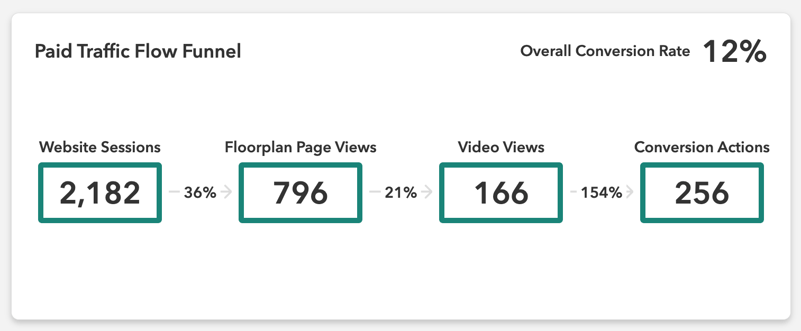
Example of the Paid Traffic Funnel Flow in the RentVision Platform.
We count the number of website sessions generated from paid traffic sources, plus the total corresponding floorplan page views and video views. These are the events that signal visitors are highly engaged.
We then count the number of web-only conversion actions that occurred from paid traffic sources—the same actions listed above: application portal clicks, direction clicks, call clicks, appointment form clicks, and contact form submissions.
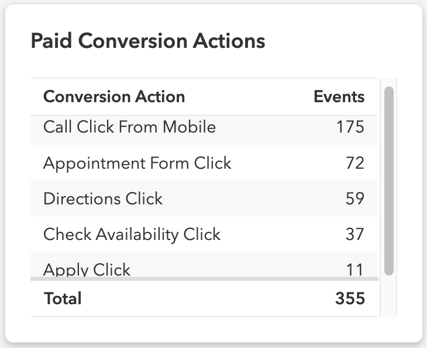
Example of the Paid Conversion Actions table in the RentVision Platform.
It's important to note that we're counting events, not tracking individual user behavior. A renter who completed a conversion action may not have viewed a floorplan page or watched a video first—but the funnel illustrates how those engagement events and conversion actions relate across your paid traffic as a whole.
This framework makes clear that the right inputs with your ads are ultimately leading to the desired outputs of high-intent leads—not just volume. The Paid Traffic Funnel Flow far exceeds generic CRM attribution or surface-level reporting in showing how ads are contributing to leasing outcomes.
Conclusion

Evaluating the performance of your multifamily digital ads shouldn't be based on assumptions that unsupported attribution data creates about your prospects' leasing journey. It requires a framework that measures how your ads are performing at a surface level, that the right renters are clicking on them, and that those renters are engaging meaningfully on your community website and taking leasing actions.
Only then can you walk into a conversation with your ownership group and say with confidence: marketing is doing its job. Here's the proof.
And when something isn't working, this framework tells you exactly where to look.
Whether that's the ads themselves, the targeting, the website experience, or something else entirely that no amount of ad spend can fix.
That's the standard we hold ourselves to at RentVision. Schedule a demo if you want to see more about how our reporting for Predictive Advertising applies this framework in practice and what that looks like for your portfolio.